- Meta optimises for the event you give it. If that event is a form fill, you get more form fills, not more clients.
- Connect your CRM to Meta through the Conversions API and send each lead status back as an event.
- Optimise campaigns on qualified leads once you have enough volume.
- In one account, the lead-to-customer conversion rate doubled after the CRM was connected.
In this article
Why Meta lead ads bring poor leadsThe fix: send CRM outcomes back to MetaHow to set it upSmall changes that improve lead qualityWhat to expectSales teams say the same thing about Meta lead ads: plenty of leads, few clients. Many leads do not answer, did not mean to submit the form, or were never a fit.
This became more visible after Meta’s Andromeda update, which changed how ads are matched to people. In the accounts I manage, lead quality dropped noticeably after it. The algorithm was doing exactly what it was asked: finding the cheapest form fills.
Why Meta lead ads bring poor leads
Meta only knows what happens on the platform. When someone submits a lead form, Meta records a conversion and looks for more people like them. It does not know that the lead never answered the phone, or that another became your biggest client.
- The optimisation event is the form submission, so the cheapest submitters win.
- Instant forms make submitting very easy, including by mistake.
- Without feedback from sales, every lead looks equally good to the algorithm.
The fix: send CRM outcomes back to Meta
The solution is to tell Meta which leads became something. In one account, we connected Zoho CRM to Meta through the Conversions API. Each time the sales team changed a lead’s status, an event was sent back to Meta.
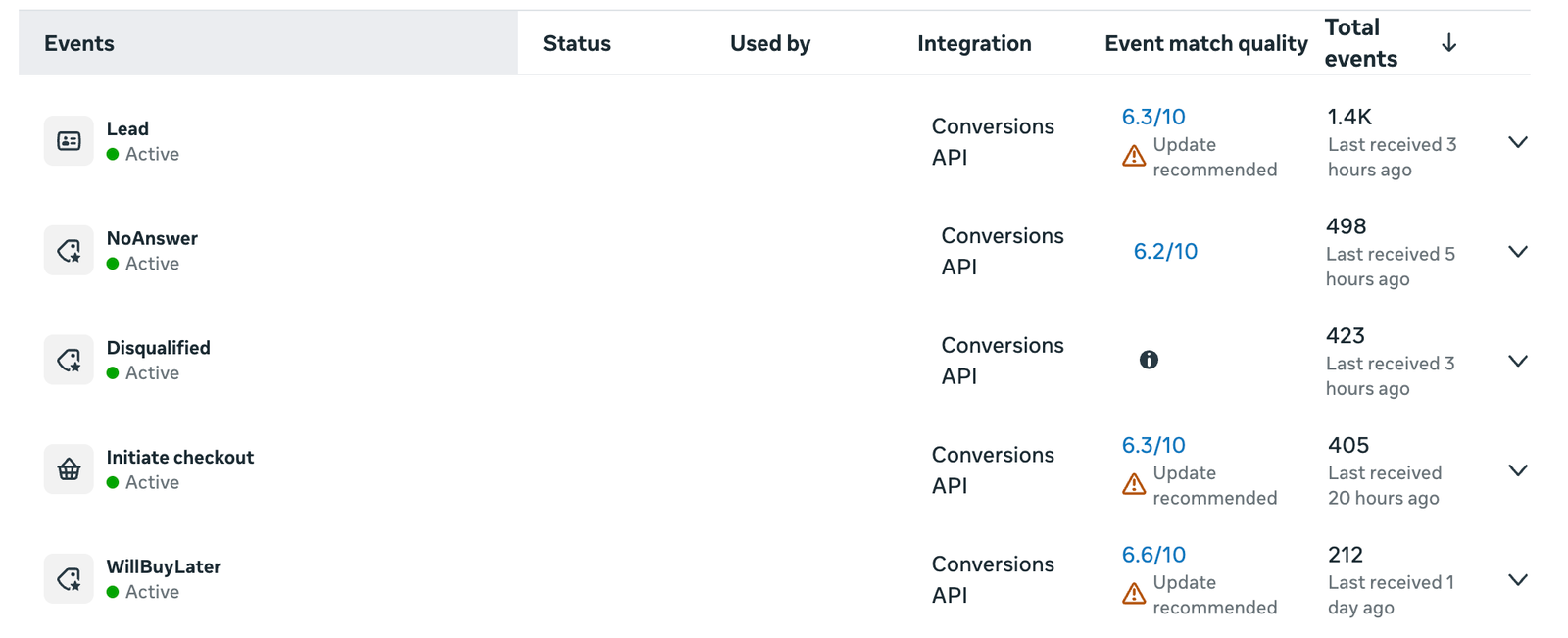
Here is what that looks like in a live account. Each CRM status has its own event in Meta, received through the Conversions API:
| Event in Meta | Sent when | Events received |
|---|---|---|
| Lead | A new lead arrives in the CRM | 1.4K |
| NoAnswer | Sales could not reach the lead | 498 |
| Disqualified | The lead is not a fit | 423 |
| WillBuyLater | Interested, but not ready yet | 212 |
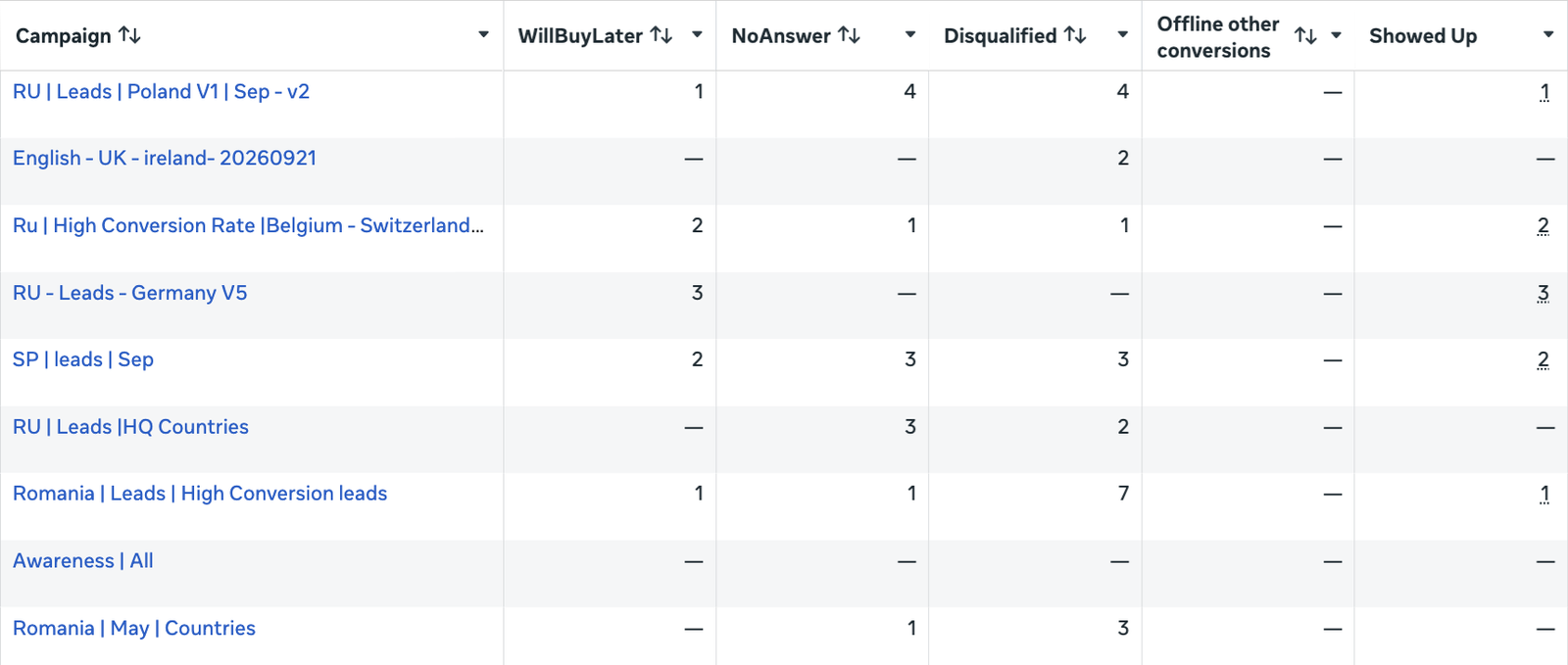
| Showed Up | The lead attended in person | Tracked per campaign |
Judge campaigns by outcome, not cost per lead
Once the statuses are columns in Ads Manager, the difference between campaigns is obvious. In the same 30 days, one campaign brought 3 leads who showed up, 3 who will buy later and no disqualified leads. Another brought 7 disqualified leads and only 1 who showed up. On cost per lead alone, they could look similar.
Notice the match quality scores too: between 6.2 and 6.6 out of 10, with Meta recommending an update. Sending more customer details with each event, such as email, phone and the Meta lead ID, raises match quality, so Meta connects more events to the right people.
With these events in place, Meta could see which leads moved through the pipeline. Once there was enough volume, campaigns were optimised on qualified leads instead of form fills.
How to set it up
- Agree what a qualified lead is with your sales team: budget, location, need, timing. Write it down.
- Clean up lead statuses in the CRM so every lead moves through the same stages, and the team updates them on time.
- Connect the CRM to the Conversions API directly or through an integration, and pass the Meta lead ID so events match the right lead.
- Map each status to an event and send it back to Meta when the status changes.
- Switch optimisation when the data allows Meta needs enough qualified-lead events per week to learn. Until then, keep optimising on leads and use the data to judge ad sets.
Small changes that improve lead quality
- Use the higher-intent form type, which asks people to review their details before submitting.
- Add one or two qualifying questions, such as budget or timeline.
- Say clearly in the ad and form what happens next and who will contact them.
- Call or message new leads within minutes, not hours.
- Exclude existing clients and unqualified leads from prospecting audiences.
What to expect
Lead volume may drop at first. Cost per lead may even rise. What matters is cost per qualified lead and cost per client, and those are the numbers that should fall.
If your sales team is drowning in leads that never close, see how I approach lead generation, or request a free audit of your current setup.
Frequently asked questions
Why are my Facebook lead ads low quality?
Because Meta optimises for form submissions, and without feedback it cannot tell good leads from bad ones. Sending CRM outcomes back through the Conversions API fixes this.
Can I connect Zoho CRM or HubSpot to Meta?
Yes. Both can send lead status changes to Meta through the Conversions API, directly or with an integration tool. The Meta lead ID must be stored so events match the right lead.
How many qualified leads does Meta need to optimise?
Meta needs a steady weekly volume of the event to exit the learning phase. If you have fewer, keep optimising on leads and use qualified-lead data to compare ad sets.
Did the Andromeda update affect lead quality?
Many advertisers saw lead quality drop after the update. Accounts that send quality signals from their CRM are better placed, because the algorithm learns from real outcomes.

Performance marketing consultant since 2018, with more than $25M in managed ad spend across Google, Meta, TikTok and Snapchat for hospitals, clinics, online stores and service businesses.
View LinkedIn profile →